 ×
AZ SPECTRUM · FIELD MANUAL
ARRICAM LT
HD IVS →
HD-SDI 1080P
CONVERSION.
AZ Spectrum retrofit of the ARRICAM LT IVS. Delivers an HD-SDI 1080p output plus two SD analog outputs — one of them with ARRI Data overlaid (speed, duration, remaining footage) for the DP's monitor. The manual explains the three connectors, how the camera's own buttons map to the OSD, and how to run the IVS flicker-free at 24, 25, or 30 fps.
Same Sony board,
different chassis.
Internally the same board as the 416 IVS, but living in the ARRICAM LT body and reusing the factory buttons. The on-set difference: the LT exposes a PAL/NTSC output with ARRI Data (footage and speed overlay) useful for the 1st AC.
Sensor
Sony HD CMOS progressive. SDI formats: 1080P 60/50, 1080i 60/50, 1080P 30/25, 720P 60/50. EX-SDI formats: 135M, 135M+, 270M.
Analog + Data
Two SD analog outputs — one standard CVBS (or HD analog AHD/TVI/CVI) and one with ARRI Data overlaid (speed, duration, footage). See section 06.
Power draw
Minimum illumination 0.1 lux at f/1.2 and 1080P 25. 10 AGC levels. Sharpness 0-10. Gamma 0.45 / 0.55 / 0.65 / 0.75. DNR, calibration patterns, digital zoom.
THREE OUTPUTS,
ONE AUXILIARY.
The LT body with the IVS carries three BNCs and a 4-pin Fischer. Each output has its audience: the DP sees HD-SDI, the 1st AC sees the analog with ARRI Data, the operator can use the extra SD/HD analog.
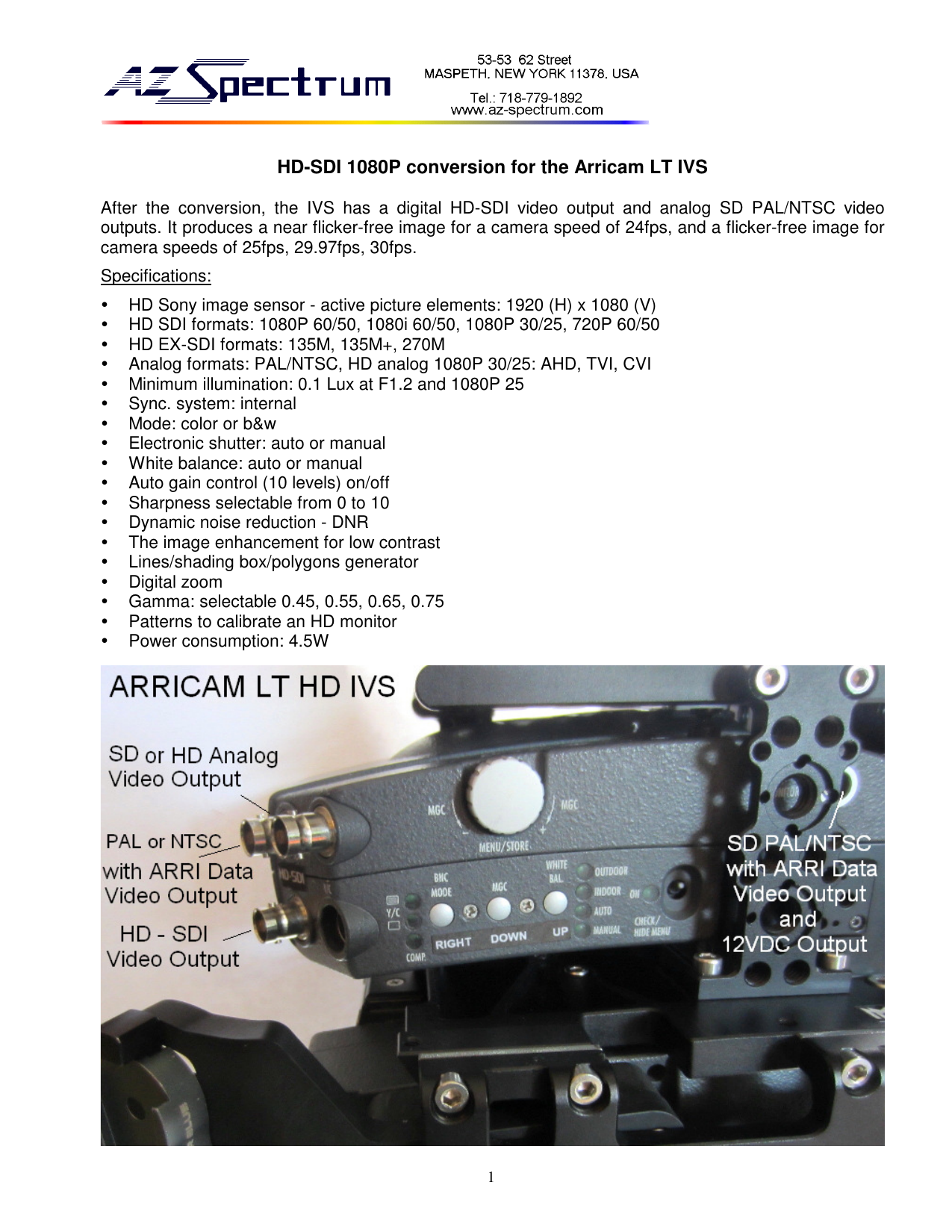
Digital / analog outputs
- Lower BNC · HD-SDI
- Digital output. To the DP's HD monitor, wireless TX, or capture.
- Upper right BNC
- SD analog PAL/NTSC (
CVBS), or HD analog (AHD / TVI / CVI). Selectable underSYSTEM → OUTPUT → ANALOG MODE. - Upper left BNC
- SD PAL/NTSC with ARRI Data overlaid — speed, duration, remaining footage. Useful for the 1st AC's read.
Lower 4-pin Fischer
Dual function: carries the same SD signal with ARRI Data as the upper left BNC, and also outputs 12 V DC for light accessories (tally light, on-board monitor).
It is NOT a power input — the camera feeds the IVS internally.
Two identical SDs = redundancy
The upper left BNC and the lower 4-pin Fischer deliver the same signal with ARRI Data. The Fischer is there for traditional ARRI viewfinder cables; the BNC is there for a script's monitor. You can use both at the same time.
THE FACTORY KEYS,
WITH NEW MEANING.
The LT adds no buttons: the IVS reuses the camera's existing ones. This is the mapping to memorize to navigate the OSD without going crazy.
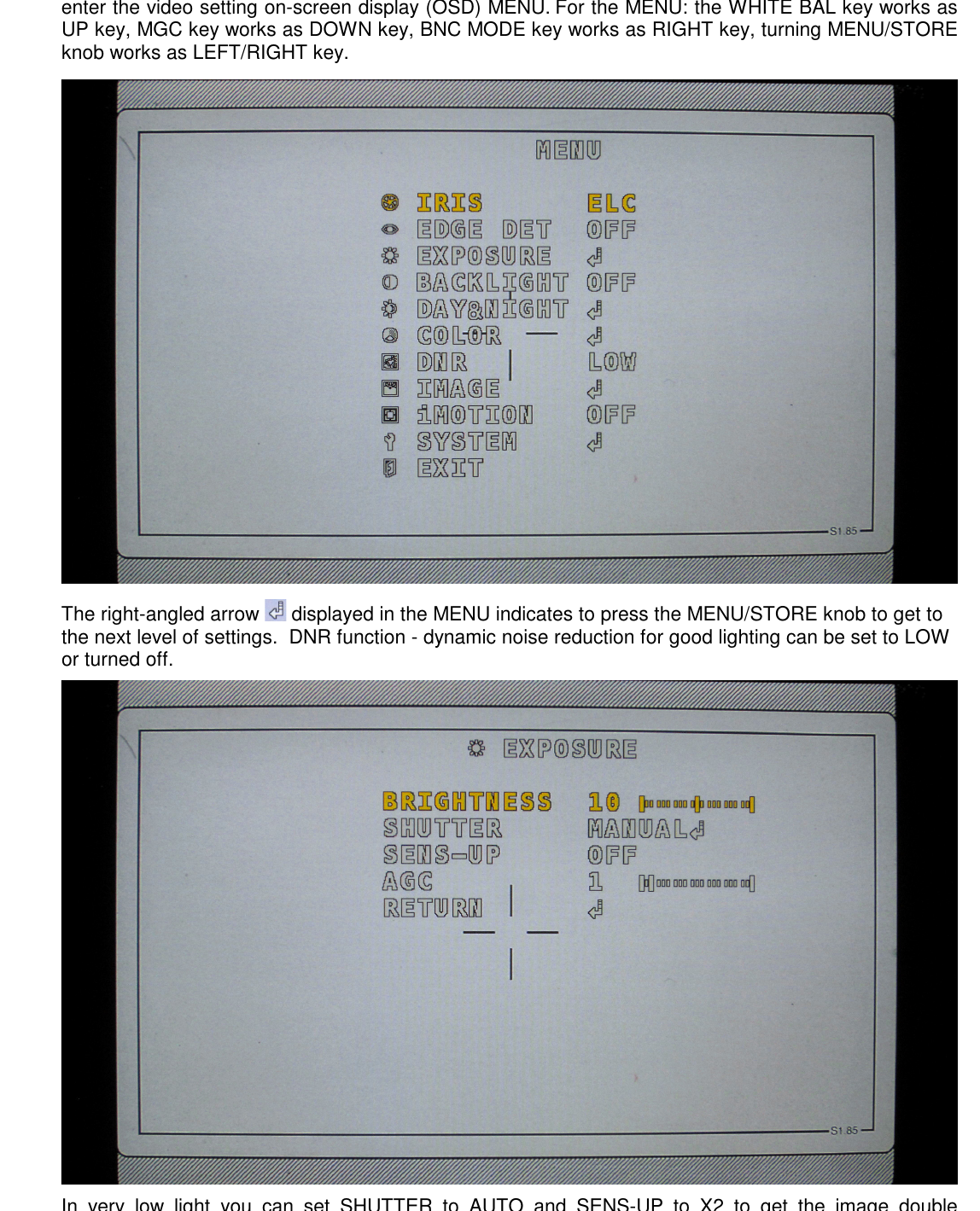
OSD mapping
- WHITE BAL
- Acts as UP — moves up between menu items.
- MGC
- Acts as DOWN — moves down between items.
- BNC MODE
- Acts as RIGHT — changes the value rightwards.
- MENU/STORE (knob)
- Turning it acts as LEFT/RIGHT. Pressing it acts as ENTER (opens submenu or confirms).
Open and close
Open the menu: press the MENU/STORE knob, or briefly toggle down the IVS power switch. The OSD appears.
Exit: navigate to EXIT and press the knob — changes save automatically when exiting via this path.
The ↵ arrow next to an item means it opens a submenu.
THREE MENU LINES,
ONE CONFIRMATION.
As with the 416, flicker is killed by tuning FREQ + FRAME RATE + SHUTTER SPEED to the camera's rhythm. LT-specific: when changing FREQ from 50 Hz to 60 Hz, confirm by holding the MENU/STORE knob for 2 seconds.
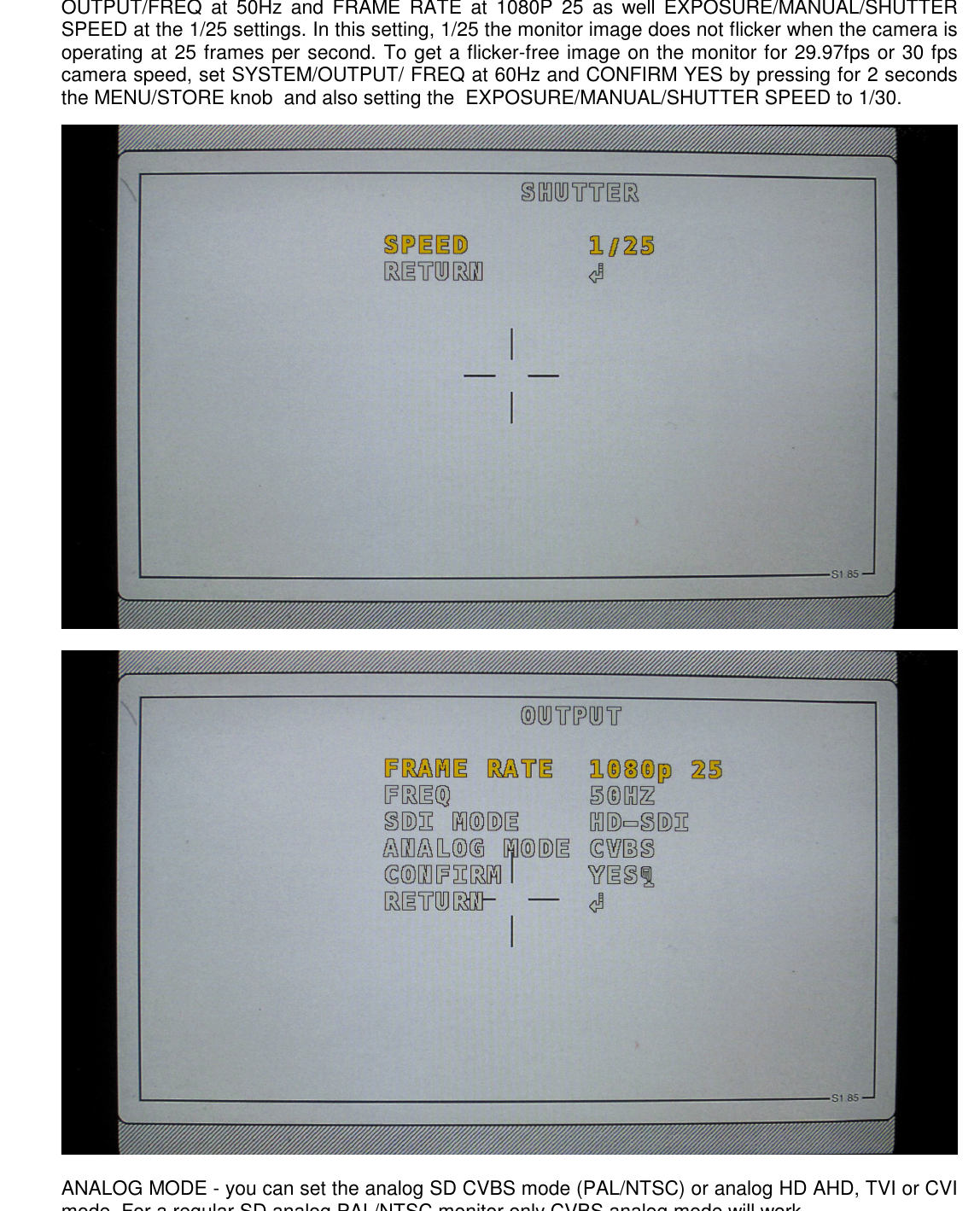
24 FPS · "25" configuration
- SYSTEM → OUTPUT → FREQ:
50 Hz - FRAME RATE:
1080P 25 - EXPOSURE → SHUTTER → MANUAL → SPEED:
1/25
The most common setup for European cinema. The monitor image stays nearly flicker-free.
25 FPS · "25" configuration
- FREQ:
50 Hz - FRAME RATE:
1080P 25 - SHUTTER SPEED:
1/25
The cleanest scenario — sensor and rotating mirror are in phase.
29.97 or 30 FPS · "30" configuration
- FREQ:
60 Hz→CONFIRM YESby holding MENU/STORE 2 seconds - FRAME RATE:
1080P 30 - SHUTTER SPEED:
1/30
Without those 2 seconds of confirmation, the 50 → 60 Hz change is discarded and the flicker stays. It's the most common trap on the LT IVS.
Don't use SYSTEM/RESET if the IVS is working well
RESET wipes the OSD entirely — back to 60 Hz and SD NTSC by default, all frame markers and privacy overlays gone. The manufacturer puts it plainly: "We do not recommend using the RESET function when the IVS is working well". Use only as last resort.
METADATA ON SCREEN
FOR THE 1ST AC.
The PAL/NTSC with ARRI Data output overlays onto the SD image the info the camera exposes on its internal bus: frame rate, take duration, remaining footage, battery voltage. The other two outputs (HD-SDI and the upper-right SD/HD analog) stay clean, with no overlay.
What you see
Top line of the monitor: 22.5V STBY FWD 0.0/25.0fps 180.0 531ft — voltage, state (STBY/RUN), direction (FWD/REV), real/set speed, shutter angle, footage consumed.
Very useful for the 1st AC in interiors where the camera panel isn't visible.
What DOESN'T change
The overlay doesn't appear in HD-SDI or in the upper-right SD/HD analog. These two outputs stay clean so the DP, gaffer, or DIT can work without distractions.
If you want the SD clean where it normally carries Data, reconfigure the AC's monitor to look at the upper-right BNC instead of the upper-left.
Brightness, shutter, sens-up, AGC.
Same four parameters as the 416, same shutter rule: MANUAL with SPEED locked to match camera speed (see section 05).
Controls
- BRIGHTNESS
- 0-20. Default
10. - SHUTTER
MANUAL+1/25or1/30.- SENS-UP
- In very low light,
×2doubles exposure at the cost of motion blur. DefaultOFF. - AGC
- Max gain (10 levels). Default
1.
Warnings
The SHUTTER AUTO mode generates flicker on any rotating-mirror camera. Don't use it for takes — only for quick checks.
AGC above 5 introduces visible noise in playback. If you need more light, open the lens aperture before raising AGC.
MANUAL, PRESET,
or AUTO with COLOR GAIN.
Four AWB modes — same as the 416. The LENSO default is AUTO with COLOR GAIN 10; we change it only if the DP asks for a specific look.
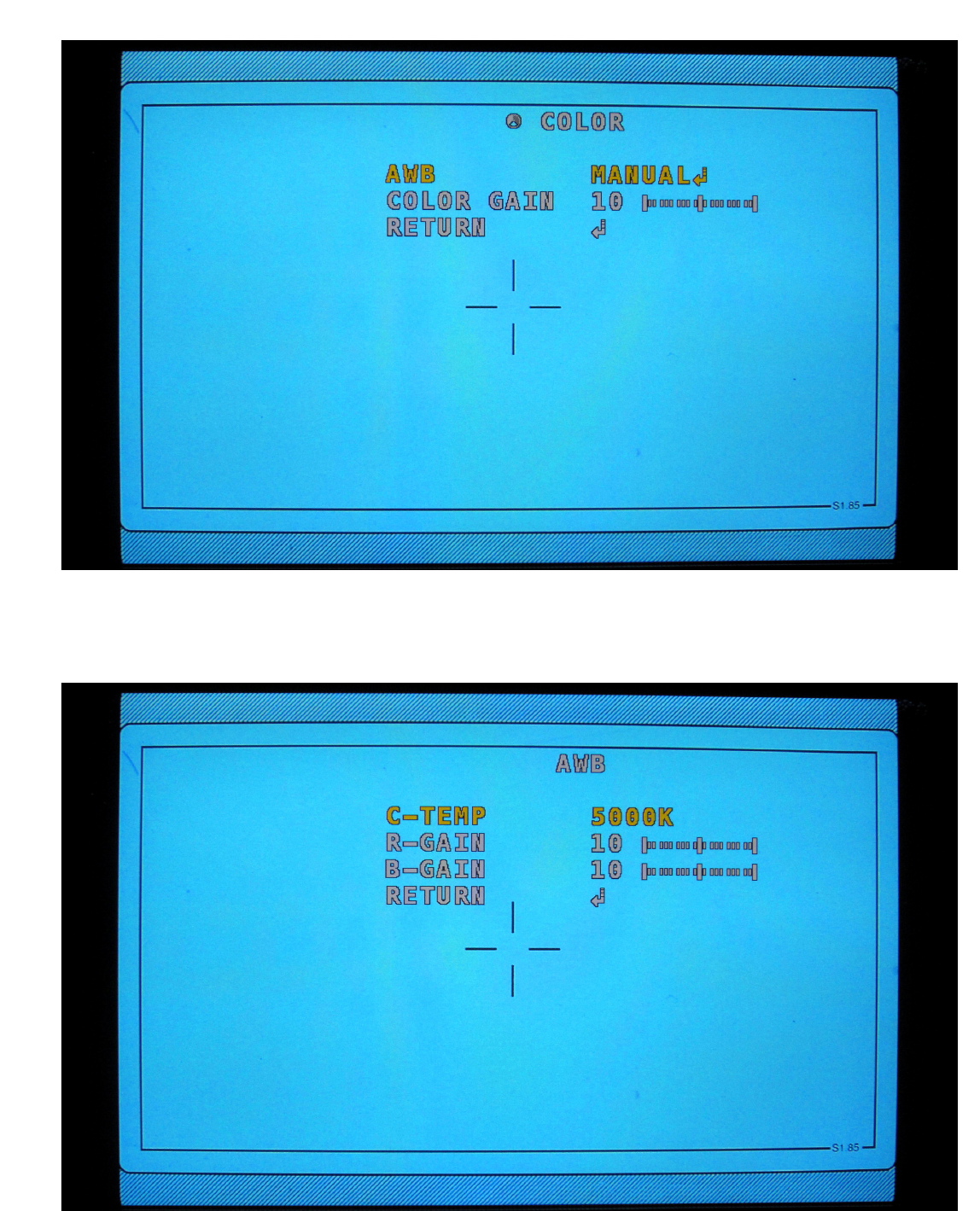
PRESET
Fixed white. Ideal when temperature doesn't change during the block.
MANUAL
3000K, 5000K, 8000K. With independent R-GAIN and B-GAIN 0-20.
AUTO
Continuous tracking. Compatible with mixed tungsten + HMI within the same shot.
COLOR GAIN
0-20. Default 10. Useful to raise or drop saturation without touching temperature.
Sharpness, gamma,
frame markers.
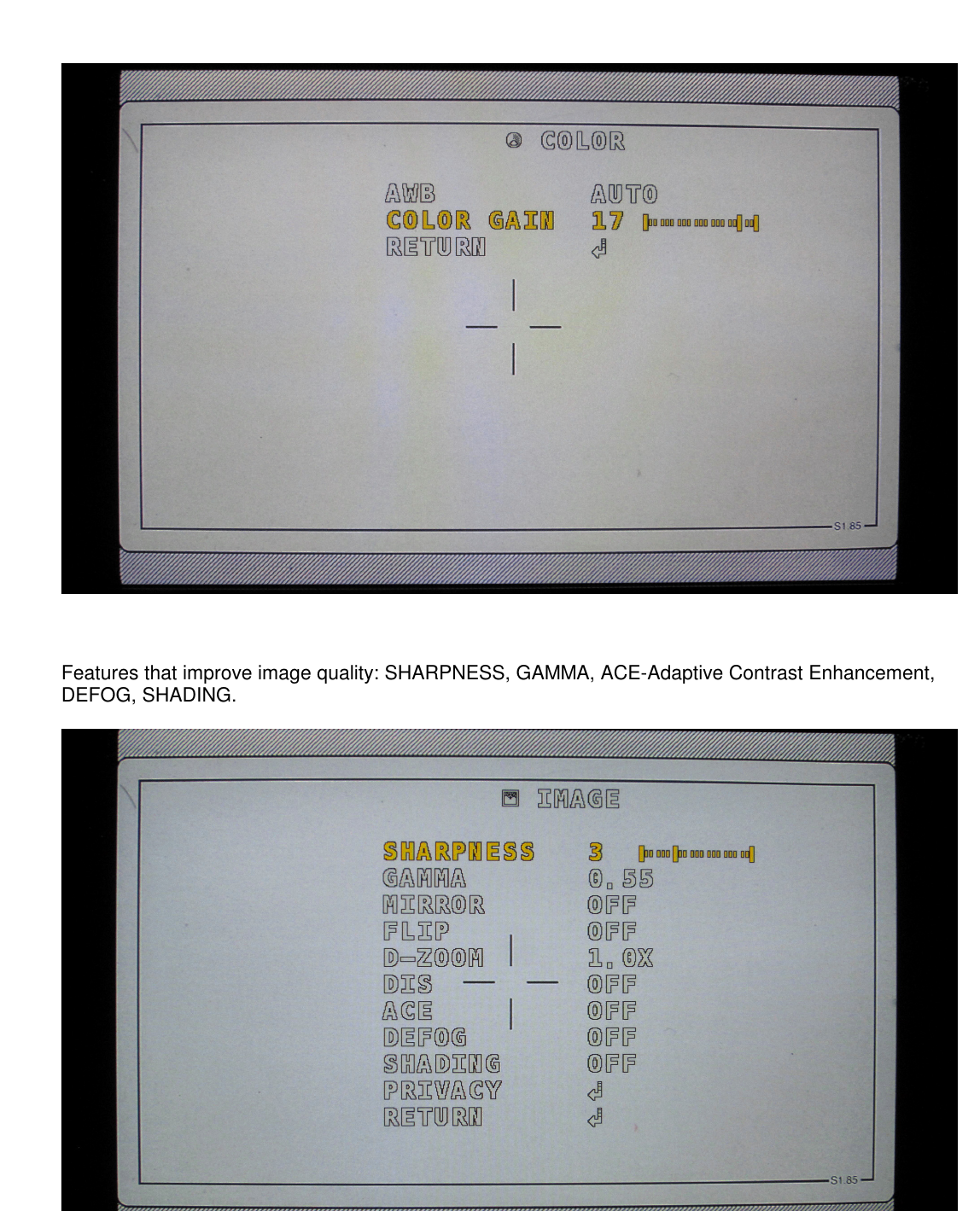
The IMAGE submenu with 11 parameters. The full list is shared with the 416 — see section 08 of the 416 manual if you need detail. Here are the three touched on set.
Processing
- SHARPNESS
- 0-10. Default
3. Above 6 = "digital" look. - GAMMA
0.45/0.55/0.65/0.75. Default0.55.- D-ZOOM
- Digital zoom up to ×10. Also as a shortcut via the MENU/STORE knob — section 11.
Overlays
- PRIVACY BOX
- 16 rectangles. V-SIZE 0 = horizontal line; H-SIZE 0 = vertical line. Useful to delimit a 2.35 ratio inside a 16:9.
- PRIVACY POLYGON
- 8 four-vertex polygons. Useful to shade over-frame or paint a framing marker.
OUTPUT, CVBS,
RESET.
Same SYSTEM items as the 416: COMM, OUTPUT, IMAGE RANGE, COLOR SPACE, CVBS, COLOR BAR, LANGUAGE, CAM TITLE, RESET. The 2-second FREQ confirmation is the LT's particularity.
OUTPUT
- FRAME RATE
1080P 25or1080P 30(see section 05).- FREQ
50 Hzor60 Hz. Changing asks for MENU/STORE knob held 2 s.- SDI MODE
- Always
HD-SDI. EX-SDI 135M / 135M+ / 270M options not used in LENSO flow. - ANALOG MODE
CVBSfor SD standard monitor; AHD/TVI/CVI for HD analog monitor.
Rest of SYSTEM
- IMAGE RANGE
FULL. Don't change.- COLOR SPACE
HD-CbCr. Don't change.- CVBS
4:3default. Keeps the SD frame matching the HD at 16:9 on the monitor.- COLOR BAR
- SMPTE bars for monitor calibration.
OFFduring takes. - LANGUAGE
- English, Korean, Japanese, Chinese, German.
- CAM TITLE
- Up to 8 overlaid characters.
- RESET
- Factory reset — see warning in section 05.
When the OSD isn't open,
the keys change role.
If you haven't pressed the MENU/STORE knob and the menu isn't visible, the ARRICAM buttons become shortcuts. Useful for quick interventions without losing the monitor image.
WHITE BAL (UP)
Short press — triggers an AWB: white re-balance against the current scene. Useful when going from tungsten to HMI without touching the menu.
MGC (DOWN)
Short press — FREEZE ON/OFF: freezes and unfreezes the image.
MENU/STORE knob
Turning counterclockwise = DZOOM− (zoom out).
Turning clockwise = DZOOM+ (zoom in).
Fast on-set triage.
The LT IVS's most common symptoms and their typical cause. Shares structure with the 416, with the LT-specific 2-second FREQ confirmation and the camera-key mapping.
| Symptom | Probable cause | Fix |
|---|---|---|
| No image at power-on | Bad SDI cable, analog cable plugged in the SDI BNC, or empty battery. | Check cable and connections. Try a short SDI reference cable. Verify camera battery charge. |
| No image from the HD-SDI BNC | The IVS switched accidentally to EX-SDI. It happens when someone turns the MENU/STORE knob three clicks counterclockwise and then presses it. | Return to HD-SDI: power the IVS off and on. Press BNC MODE 3 times, then the MENU/STORE knob. After 3 seconds it returns to HD-SDI. Or from the menu: SYSTEM → OUTPUT → SDI MODE → HD-SDI. |
| Continuous monitor flicker | FREQ, FRAME RATE, or SHUTTER don't match camera speed. | Apply the combo from section 05 — confirm the FREQ change by holding MENU/STORE for 2 seconds. |
| Partial SDI image only | Internal sync error. | Power the IVS off and back on. |
| Image frozen at startup | The MGC (FREEZE) key was left active. |
Press MGC once to unfreeze. |
| No signal in lower Fischer or upper-left BNC | SYSTEM → CVBS disabled. |
Check that SYSTEM → CVBS is set to 4:3, not OFF. |
| ARRI Data not showing on AC's monitor | The AC's monitor is connected to the wrong BNC (upper right = no Data) instead of upper left or the lower Fischer. | Move the AC's monitor cable to the upper left BNC or the lower Fischer — both carry the signal with ARRI Data overlaid. |
| FREQ 50 → 60 Hz change "won't apply" | The change wasn't confirmed. | Hold the MENU/STORE knob for 2 seconds on CONFIRM YES. |
| Everything off after too much tweaking | Menu in inconsistent state. | Last resort: SYSTEM → RESET → ON. Reapply frame rate and overlays. Advised against if the IVS still works (see section 05). |